Pilih sesuai kebutuhan bisnis. Kelola dalam satu platform.Invest in the capabilities your business needs.
Mulai dari dokumen, versi, dan hak akses. Tambahkan modul yang membantu tim menyelesaikan pekerjaan, dengan cakupan yang jelas sejak awal.Build on a shared document foundation. Select the modules and integrations that address your operating priorities, with a clear scope for each investment.
Ketahui cakupan yang Anda pilihKnow what your investment includes
Label menunjukkan fitur bawaan, modul tambahan, konektor, dan pekerjaan implementasi. Gunakan sebagai acuan saat menentukan kebutuhan.Each capability identifies its delivery scope: foundation, optional module, external connector, or implementation work.
Jadikan dokumen acuan kerja yang dapat diandalkan.Give teams a reliable source of business records.
Simpan isi, versi, identitas, dan hak akses pada dokumen yang sama. Tim dapat memeriksa informasi sebelum mengambil keputusan.Keep documents, versions, ownership, and access together. Reduce uncertainty about the information behind a decision.
FondasiFoundation01.1
Dokumen tertata untuk pekerjaan timOrganize work across teams
Folder bertingkat dan sistem hak aksesNested folders and access controls
Tampilan daftar atau grid, pilihan kolom, dan tampilan tersimpanList, grid, configurable columns, and saved views
Seret dan lepas, sematkan, pindahkan, pulihkan, atau hapus fileDrag and drop, pins, moves, trash, and restore
Tindakan massal dan ekspor ZIP sesuai hak aksesBulk actions and permission-aware ZIP export
FondasiFoundation01.2
Kendali versi dan perubahanControl changes and published versions
Bandingkan versi, periksa kondisi sebelumnya, dan pulihkan versi lamaCompare versions, inspect snapshots, and roll back
Pisahkan draf kerja dari versi yang sudah diterbitkanSeparate working copies from published versions
Kunci file yang format aslinya harus dipertahankanLock files whose original formatting must be preserved
FondasiFoundation01.3
Identitas dan klasifikasi dokumenIdentify and classify business records
Jenis dokumen yang bisa disesuaikan dengan kebutuhan organisasiDocument types configurable to organizational needs
Tag, lampiran, link antardokumen, dan deskripsiTags, attachments, document links, and descriptions
Format ID dan skema penomoran berdasarkan kebutuhan organisasiDocument IDs and numbering schemes for organizational rules
Status draf, final, kedaluwarsa, dan tidak berlakuWorking, final, expired, and obsolete states
FondasiFoundation01.4
Diskusi terhubung dengan dokumenKeep collaboration with the record
Simpan komentar dan pembahasan bersama dokumenComments and discussions remain attached to the document
Berikan akses kepada grup, jabatan, atau penggunaAccess groups, positions, and users as permission subjects
Pencarian cepat dan pintasan keyboard untuk pekerjaan rutinCommand search and keyboard shortcuts for routine work
FondasiFoundation01.5
Standar sejak dokumen dibuatStandardize how documents start
Mulai dari file kosong atau template DOCX yang sudah disetujuiStart from a blank file or an approved DOCX template
Terapkan jenis, nomor, klasifikasi, dan akses sejak dokumen dibuatApply type, numbering, classification, and access at creation
Publikasikan versi final tanpa memutus riwayat dokumenPublish a final version without breaking document history
02 / CAPTURE & MIGRASI
Benahi pengelolaan arsip. Pertahankan informasi pentingnya.Modernize the process. Preserve the business record.
Satukan file digital dan hasil scan dalam struktur yang tertib. Rencanakan perpindahan berdasarkan informasi dan hak akses yang perlu dipertahankan.Bring digital files and scans into a controlled repository. Plan the migration around the context your teams need to retain.
Hasil perpindahan bisa diperiksaReduce migration uncertainty
Periksa contoh sebelum memindahkan seluruh arsip.Validate a sample before committing to cutover.
Uji struktur, metadata, hak akses, hasil OCR, dan jumlah file pada sampel. Gunakan hasilnya untuk menentukan cakupan dan tahapan migrasi.Check structure, metadata, access, OCR, and file counts on representative records. Use the results to confirm scope and plan the rollout.
01
Petakan sumberMap the sourcesDrive bersama, DMS sebelumnya, ekspor sistem, atau hasil pindai.Shared drives, previous DMS exports, system exports, or scanned files.
02
Uji sampelValidate a sampleCek OCR, struktur folder, metadata, dan akses.Check OCR, folders, metadata, and access.
03
Pindahkan bertahapMigrate in controlled batchesCocokkan jumlah file dan hasilnya sebelum sistem dialihkan.Reconcile file counts and results before cutover.
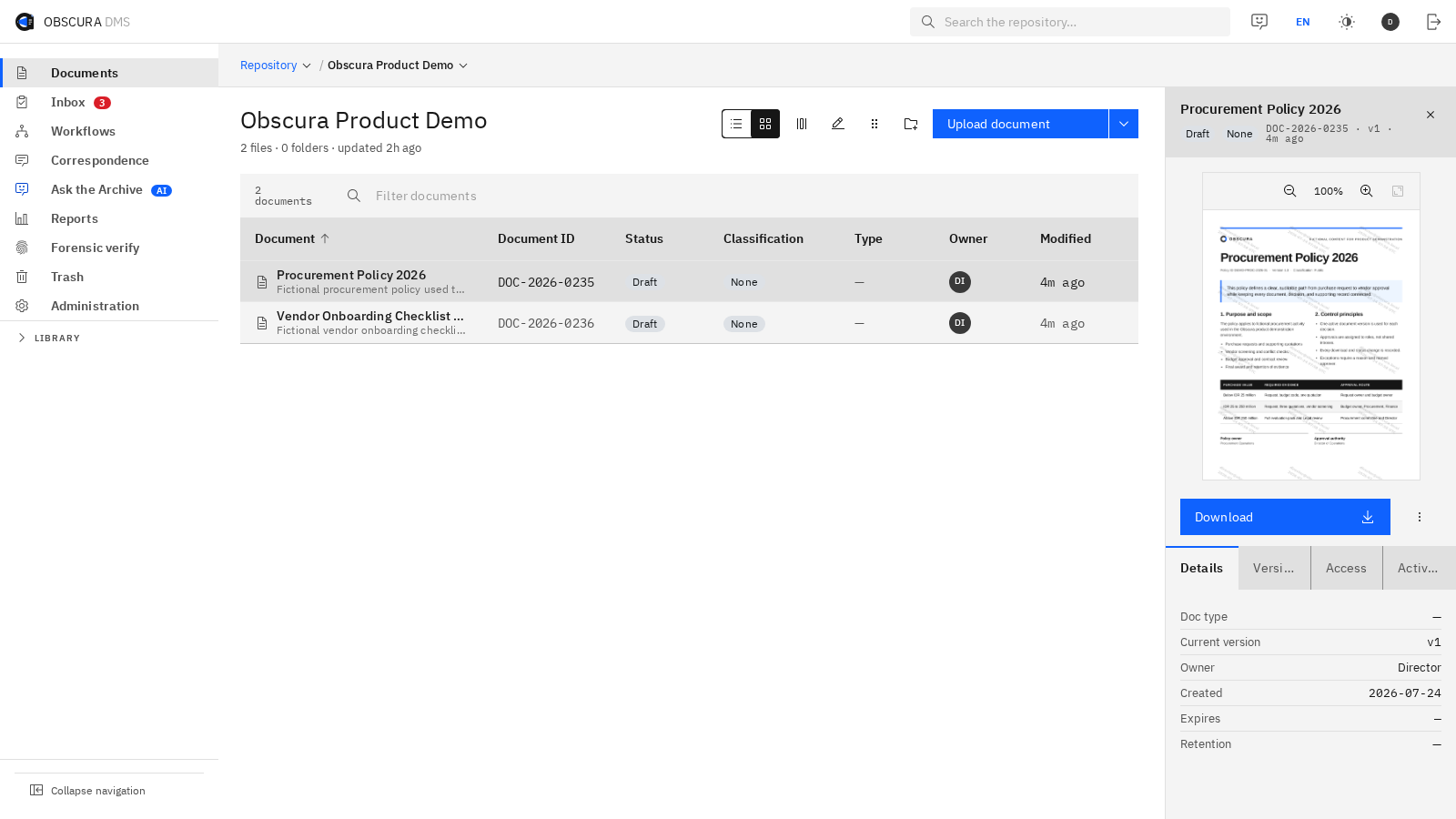
Perbesar gambarEnlarge Image↗Tim dapat membuka dan memeriksa dokumen hasil migrasi sebelum menyetujui tahap selanjutnya.Review migrated records in their new structure before approving the next batch.
FondasiFoundation02.1
Penerimaan dokumen lebih tertibCollect records with less manual administration
PDF, DOCX, XLSX, PPTX, image, text, dan format Office lain
Unggah banyak file dengan metadata yang samaBulk upload with shared metadata
Permintaan dokumen dan pemantauan kelengkapannyaDocument requests and intake tracking
Open with Obscura dari perangkat mobileOpen with Obscura from mobile devices
FondasiFoundation02.2
Isi dokumen hasil scan dapat dicariMake scanned information searchable
OCR Bahasa Indonesia dan InggrisIndonesian and English OCR
PDF scan dan file gambarScanned PDFs and image files
Deteksi per halaman untuk dokumen campuranPer-page detection for mixed documents
Teks hasil ekstraksi langsung dapat dicariExtracted text becomes searchable immediately
ModulModule02.3
Kurangi pengisian data secara manualReduce manual classification
Saran folder berdasarkan isi dokumenFolder suggestions based on document content
Saran klasifikasi, tag, dan deskripsiSuggested classification, tags, and description
Ekstraksi informasi penting dari isi dokumenExtraction of important document fields
Semua saran diperiksa pengguna sebelum disimpanUsers confirm suggestions before saving
Cakupan proyekProject scope02.4
Perpindahan arsip yang terencanaPlan and verify the migration
Migrasi dari DMS sebelumnya dan sumber lain melalui pemetaanMigrations from previous DMS platforms and other mapped sources
Pemetaan folder, metadata, pemilik, dan aksesFolder, metadata, ownership, and access mapping
Migrasi bertahap, pencatatan, dan pencocokan hasilMigration batches, logs, and result reconciliation
Waktu peralihan sesuai volume dan toleransi gangguan layananCutover planned around volume and downtime
03 / SEARCH & AI
Informasi lebih mudah ditemukan. Keputusan punya rujukan.Find the information behind the decision.
Temukan dokumen berdasarkan isi dan metadata. Jika AI digunakan, jawaban menyertakan sumber sesuai hak akses pengguna.Help teams locate documents and use AI with source references. Search respects the user's access permissions.
FondasiFoundation03.1
Pencarian isi dan filter lanjutanFind records across content and metadata
Cari judul, isi, tag, metadata, dan ID dokumenSearch titles, content, tags, metadata, and document IDs
Filter klasifikasi, jenis, status, dan kedaluwarsaFilter by classification, type, status, and expiry
Hasil langsung disaring berdasarkan hak akses penggunaResults are filtered by user access
ModulModule03.2
Pencarian berdasarkan maknaSemantic search
Temukan dokumen dengan makna serupa meski menggunakan kata berbedaSearch by meaning, not only matching words
Lihat tingkat kemiripan dan dokumen terkaitSee similarity and related documents
Embedding dapat dijalankan secara lokalEmbeddings can run locally
ModulModule03.3
Jawaban dari arsip organisasiGet answers from your archive
Tanya satu dokumen atau kumpulan folder tertentuAsk one document or a selected set of folders
Jawaban menyertakan sumber yang dapat dibukaAnswers include openable source references
Riwayat percakapan dan batas pencarian tersimpanConversation history and search scope are retained
ModulModule03.4
AI sesuai kebijakan organisasiChoose how your organization uses AI
Pakai model lokal, penyedia yang disetujui, atau matikan AIUse a local model, an approved provider, or disable AI entirely
Batas penggunaan dan pengaturan di halaman adminUsage limits and settings in the admin console
Akses teks melalui MCP mengikuti identitas, izin, dan pencatatan auditMCP reads text within identity, permission, and audit controls
Rujukan untuk memeriksa jawabanEvidence your team can check
Cari jawabannya, lalu periksa dokumen sumbernya.Make the source part of the answer.
Jawaban AI menyertakan rujukan yang bisa dibuka pengguna. Pencarian sumber tetap mengikuti hak akses dokumen.AI answers link to source documents for review. Retrieval respects document permissions, so users work within their existing access.
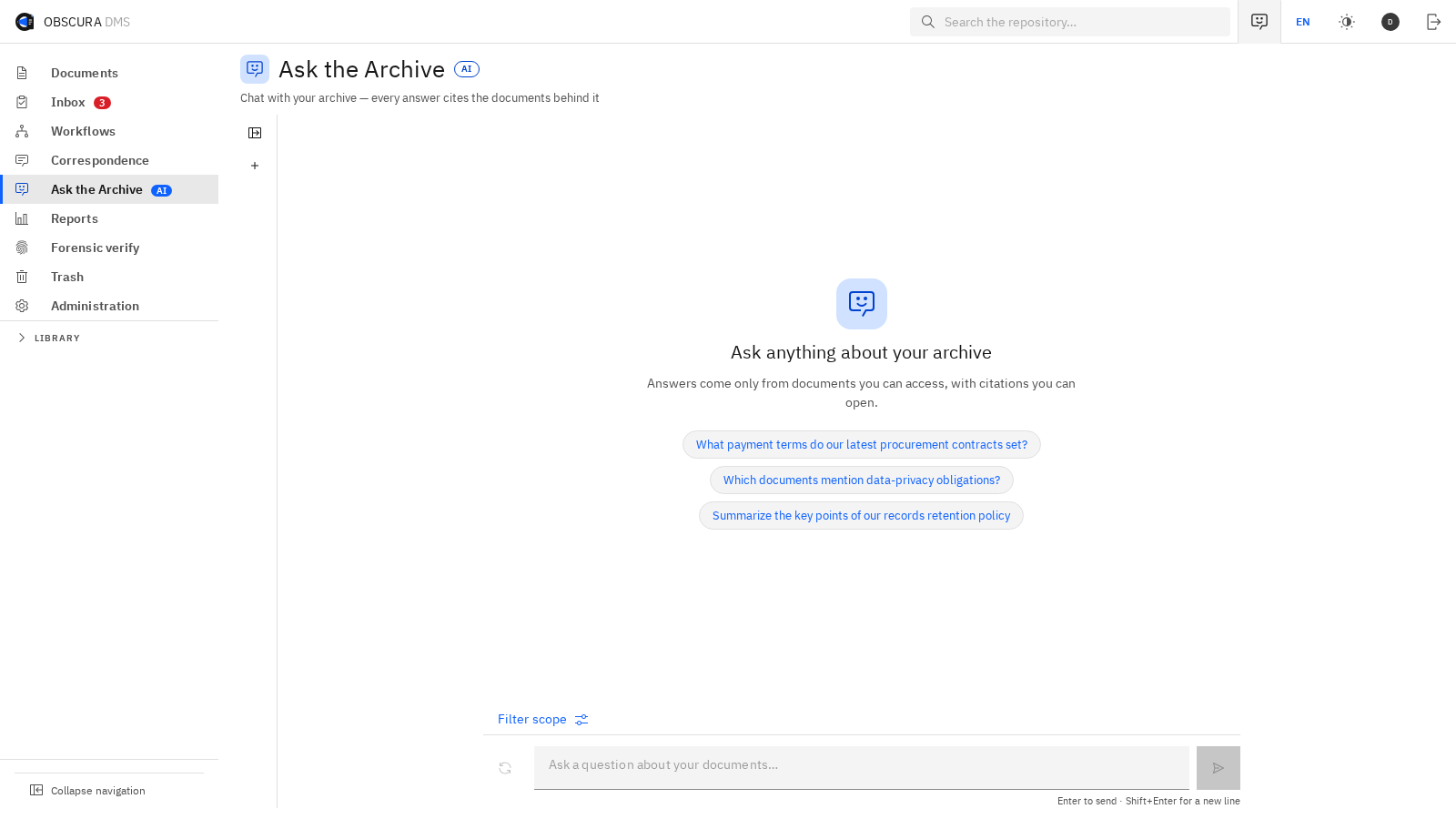
Perbesar gambarEnlarge Image↗Tim dapat memeriksa informasi pada dokumen yang menjadi dasar jawaban.Open the cited documents to check the information behind an answer.
04 / WORKFLOW, OFFICE & SIGNING
Lanjutkan pekerjaan tanpa berpindah-pindah aplikasi.Move decisions forward in one workspace.
Hubungkan penyusunan, pemeriksaan, persetujuan, tanda tangan, dan penerbitan. Kurangi pemindahan file serta pencatatan ulang di antara tahapan.Connect drafting, review, approval, signing, and publication. Reduce the file transfers and manual follow-up between those steps.
FondasiFoundation04.1
Tugas dan persetujuan dengan penanggung jawabAssign work and track decisions
Pakai alur tersimpan atau buat alur khusus untuk satu dokumenUse a saved workflow or create one for a single document
Setujui, tolak, kembalikan untuk direvisi, dan simpan catatan keputusanApprove, reject, return for revision, and retain decision notes
Penugasan kepada pengguna, jabatan, atau pihak luarAssignments to users, positions, or external parties
Tenggat, eskalasi, delegasi, dan daftar tugasSLAs, deadlines, escalation, delegation, and action inbox
Modul OfficeOffice module04.2
Edit file Office di browserEdit Office files in the browser
DOCX, XLSX, PPTX, ODF, dan format Office lama
Simpan hasil edit sebagai versi baruSave edits as a new version
Font organisasi dapat dipasang oleh adminOrganization fonts can be installed by an administrator
Terbitkan draf kerja sebagai PDF finalPublish a working copy as a final PDF
Modul + konektorModule + connector04.3
E-sign, PSrE, dan e-MeteraiE-sign, PSrE, and e-Meterai
Tanda tangan internal PAdES dan pihak eksternal tanpa akunInternal PAdES signing and accountless external signing
Urutan paralel atau berurutan untuk banyak penandatanganParallel or sequential multi-party signing
Posisi tanda tangan, e-Meterai, dan stempel digitalSignature, e-Meterai, and digital-stamp placement
Penyedia PSrE dan e-Meterai dipastikan untuk setiap lingkunganPSrE and e-Meterai providers are confirmed for each deployment
ModulModule04.4
Persuratan resmi dan tindak lanjutManage official correspondence
Surat masuk, surat keluar, klasifikasi, dan agendaIncoming and outgoing correspondence, classification, and registry
Kop, template DOCX, dan penomoran suratLetterheads, DOCX templates, and letter numbering
Disposisi ke pengguna atau posisi dengan instruksi dan tenggatDisposition to users or positions with instructions and deadlines
Persetujuan, tanda tangan, stempel, dan arsip dalam satu alurApproval, signing, stamping, and filing in one flow
Revisi tetap menjadi bagian dari riwayatLess coordination during review
Selesai mengedit, dokumen siap diperiksa.Keep editing connected to the decision.
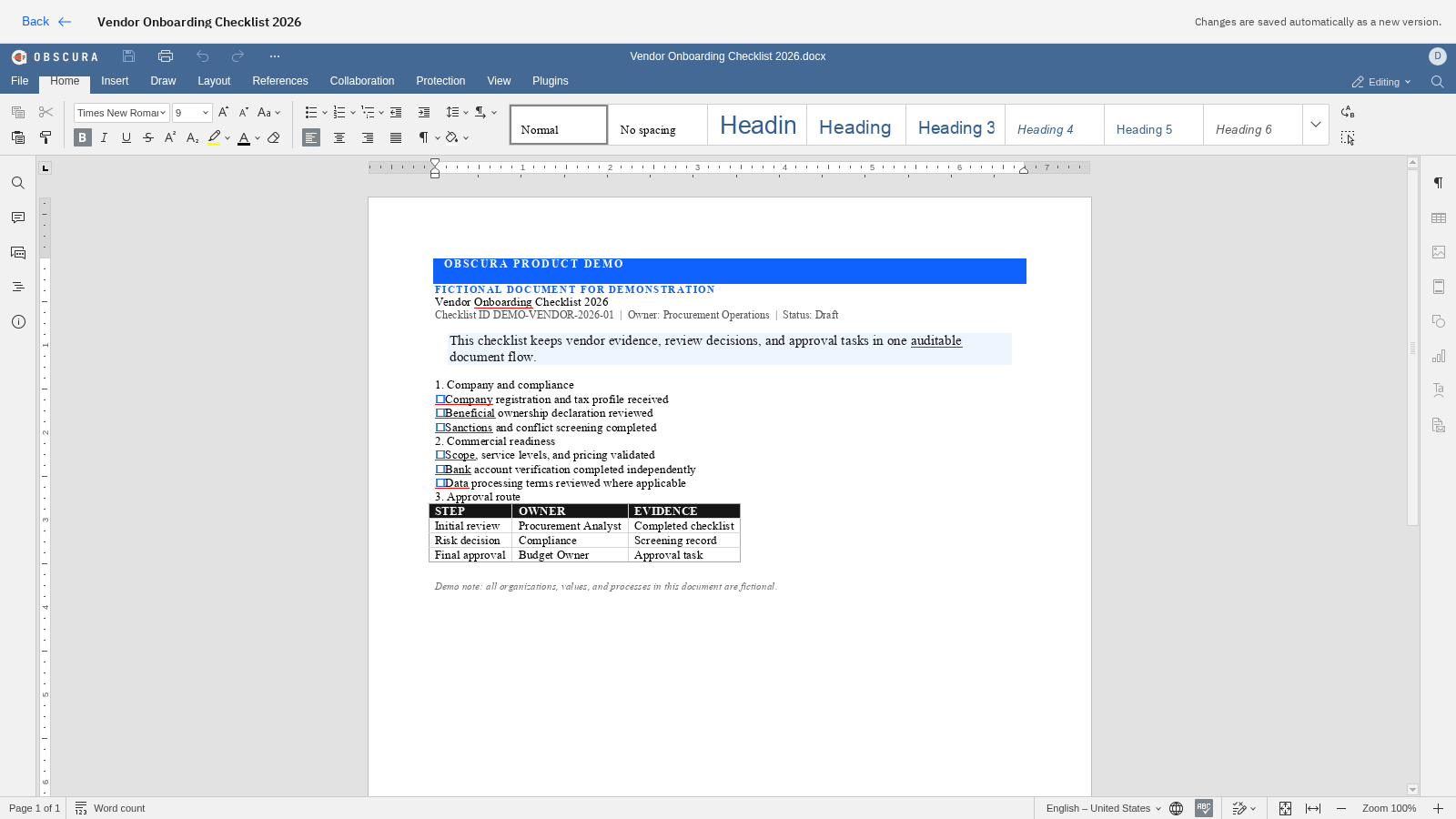
Simpan hasil edit di browser sebagai versi baru. Tim dapat melanjutkan pemeriksaan atau persetujuan tanpa mengunduh dan mengunggah ulang file.Save browser edits as a new version, ready for review or signing. Reduce the need to download, upload, and reconcile files.
Perbesar gambarEnlarge Image↗Perubahan disimpan sebagai versi baru sebelum dokumen diteruskan untuk persetujuan atau penandatanganan.Edits return to the document's version history before the next approval or signature.
05 / RECORDS, SHARING & EVIDENCE
Bagikan sesuai kebutuhan. Tetapkan batas aksesnya.Share information with clear controls.
Atur akses, masa berlaku tautan, dan retensi. Simpan bukti aktivitas agar penggunaan dokumen dapat ditelusuri kembali.Set access and sharing rules, manage retention, and retain activity evidence. Give teams a consistent way to handle sensitive records.
FondasiFoundation05.1
Masa simpan dan penahanan penghapusanApply retention and preserve required records
Katalog aturan retensi berdasarkan jenis dokumenRetention catalog by document type
Legal hold yang menahan penghapusanLegal holds that prevent deletion
Tinjau, musnahkan, pindahkan, atau perpanjang masa simpanReview, destroy, transfer, or extend
Pengingat arsip yang jatuh tempoReminders for records due for disposition
FondasiFoundation05.2
Berbagi dokumen dengan batas yang jelasManage external sharing
Link berbatas waktu yang dapat dicabutExpiring, revocable links
Lindungi dengan kata sandi, OTP email, atau daftar penerimaProtect links with a password, email OTP, or an allow-list
Log akses untuk setiap linkAccess logs for every link
Hak berbagi mengikuti klasifikasi dokumenSharing follows document classification
FondasiFoundation05.3
Kendali tampilan dan unduhanControl viewing and downloads
Tampilan aman tanpa mengirim file PDF asli ke browserSecure preview without sending original PDF bytes to the browser
Klasifikasi dapat melarang download tetapi tetap mengizinkan bacaClassifications can block downloads while allowing reading
Watermark identitas pada tampilan dokumenIdentity watermarking on preview pages
Proteksi tangkapan layar pada aplikasi mobile untuk dokumen tertentuMobile screenshot protection for selected documents
ModulModule05.4
Telusuri bukti pada salinan yang beredarTrace evidence in distributed copies
Identitas penerima pada salinan yang keluarRecipient identity embedded in outbound copies
Konsol untuk memeriksa salinan yang ditemukanConsole for examining a recovered copy
Catatan penerbitan menghubungkan file, versi, dan penerimaIssuance ledger connecting file, version, and recipient
Kompatibilitas diuji menggunakan contoh dokumen organisasiCompatibility is tested on your document corpus
FondasiFoundation05.5
Audit log dan laporan operasionalReview activity and operational reports
Hubungkan tindakan, waktu, pengguna, versi, dan status pada dokumen yang samaConnect actions, time, users, versions, and status to the same document
Saring riwayat berdasarkan kejadian dan rentang waktuFilter history by event and time range
Lihat laporan operasional untuk dokumen, aktivitas, dan prosesView operational reports for documents, activity, and processes
Buka bukti yang relevan langsung dari laporan atau jejak auditOpen relevant evidence directly from reports or the audit trail
06 / SECURITY, MOBILE & PLATFORM
Mudah digunakan tim. Pengelolaannya jelas untuk IT.Support daily work. Keep IT in control.
Sesuaikan akun, hak akses, penyimpanan, integrasi, dan pemulihan dengan standar organisasi. Modul memakai fondasi pengelolaan yang sama.Align identity, hosting, integrations, and recovery with your organization's standards. Use a consistent foundation across selected modules.
FondasiFoundation06.1
Akun dan hak akses organisasiConnect identity and govern access
Akun lokal, OIDC SSO, LDAP/Active Directory, dan SCIMLocal accounts, OIDC SSO, LDAP/Active Directory, and SCIM
TOTP, pengelolaan sesi, perangkat, dan pemulihan akunTOTP, session management, devices, and recovery controls
Hak akses lima tingkat, pewarisan izin, pengecualian, dan aturan penolakanFive-tier ACLs, inheritance, overrides, and deny rules
Peran di aplikasi dipisahkan dari izin membuka isi dokumenFunctional roles remain separate from content access
FondasiFoundation06.2
Penempatan dan operasional sistemMatch deployment to operational needs
On-premise, jaringan tertutup, atau konektor terkontrolOn-premise, closed-network, or controlled-connector profiles
PostgreSQL, penyimpanan objek S3/MinIO, dan instalasi berbasis DockerPostgreSQL, S3/MinIO object storage, and Docker-based deployment
Pencadangan terjadwal, katalog cadangan, dan prosedur pemulihanScheduled backups, backup catalog, and restore procedure
Pemantauan layanan, pelacakan opsional, batas permintaan, dan kuotaHealth checks, metrics, optional tracing, rate limits, and quotas
Aplikasi pendampingCompanion application06.3
Obscura MobileObscura Mobile
Daftar tugas, penelusuran dokumen, dan pencarian isi atau maknaAction inbox, browse, full-text, and semantic search
Tampilan aman, riwayat versi, dan dokumen tersimpan untuk akses offlineSecure preview, version history, and offline pins
Persetujuan, penolakan, disposisi, tanda tangan, e-Meterai, dan stempelApprove, reject, route, sign, apply meterai, and stamp
Modul + APIModule + API06.4
Hubungkan dengan sistem yang sudah digunakanConnect to your existing systems
OpenAPI 3.1 sebagai kontrak APIOpenAPI 3.1 as the API contract
API key yang terikat pada identitas dan batas aksesAPI keys bound to identity and scope
MCP untuk pencarian dan pembacaan teks secara terkendaliMCP for controlled document search and text access
OAuth untuk konektor AI dan jalur penyedia yang disetujuiOAuth for AI connectors and approved provider routes
Bahan pemeriksaan tim IT dan keamananSupport the investment review
Pastikan arsitektur, lokasi data, dan kebutuhan koneksi sesuai kebijakan sebelum memulai uji coba.Give IT and security a clear view of architecture, dependencies, and external connections before the pilot.
Mulai dari prioritas organisasiBuild the case for rollout
Uji manfaatnya. Perluas sesuai hasilnya.Start with one priority. Expand on proven value.
Pilih proses dengan waktu tunggu atau pekerjaan manual yang perlu dikurangi. Sepakati cakupan dan ukuran keberhasilan sebelum memulai uji coba.Define a pilot around turnaround time, manual effort, and control requirements. Agree on success criteria before committing to a wider rollout.